Why a Weekly Plan Needs Blank Space
Why a weekly plan needs blank space: protect focused work and handle late changes without rearranging every commitment on your calendar.
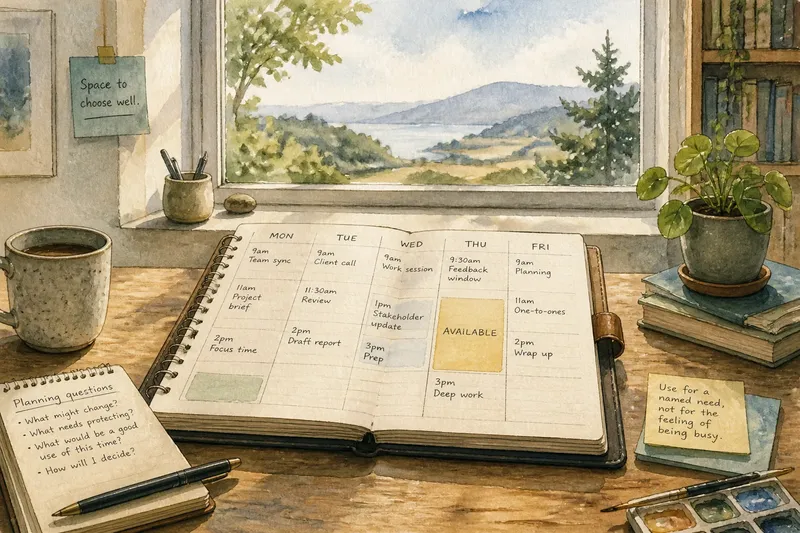
A weekly plan needs blank space to keep one late change from dislodging unrelated work. If a Tuesday call runs long, a deliberately unassigned block gives you a place to put the displaced task without shifting the rest of the calendar.
This space is not a general invitation to catch up. It is a decision point: once the week reveals what has changed, you can choose whether the open time should absorb the change, stay open, or go to a task that now matters more.
Keep one delay from moving every later task
A tightly sequenced calendar assumes that each appointment ends on time and each transition takes no effort. Real schedules include late meetings, notes to write, materials to gather, and the small business of getting ready for the next thing.
Place an unassigned block after a cluster of commitments or near a handoff that often runs late. If a task slips, move that task into the opening only when it fits; do not automatically push every later block forward.
Leave the block unnamed beyond “available.” A label such as “catch up” quietly turns a choice into a standing assignment.
Give interruptions a place without surrendering focused work
Short interruptions can consume more attention than their calendar footprint suggests. A missing file, a necessary reply, or a request for clarification may interrupt a focused session and leave you with the extra work of finding your place again.
Keep a usable opening near work that depends on other people or incoming information. When a request arrives, decide whether it needs attention immediately; if it can wait, put it in a suitable later slot rather than letting it take the nearest gap by default.
Say you schedule a report for Tuesday and are waiting for a colleague’s comments. You have marked an open block for Thursday but have not assigned it. If the comments arrive on Wednesday and need a revision, you move that revision into Thursday; if they arrive earlier and the revision is done, Thursday stays available for a different need. The observable result is that the report has a place to go without moving unrelated appointments.
Make blank time serve a real decision
An open block can look unfinished beside a calendar full of named tasks. Filling it with low-priority work may make the display tidier, but it removes the very option the space was meant to preserve.
When a change appears, use this sequence:
- Mark the opening clearly. Enter “available” in the calendar. If the block is visible and truly unassigned, keep it open; if another person needs to understand its status, share that it is reserved for flexibility rather than promised work.
- Separate fixed commitments from movable tasks. Identify appointments and real deadlines. If a task has no immediate deadline and can move, consider it for the opening; if it cannot move, protect its place and look for another response.
- Check whether the change is urgent. If it must happen before the next suitable opportunity, use the opening if the work fits; if it can wait, schedule it later rather than letting urgency by appearance make the decision.
- Match the task to the block. Check whether the time, location, materials, and quiet needed are available. If they are, place the task there; if they are not, choose a more suitable slot or reduce the task to a part that can be completed.
- Restore the opening when the need passes. If the delay is resolved or the request is cancelled, remove the temporary task. If it still needs attention, give it a named place rather than leaving it as a vague occupant.
- Notice repeated use. If the same task repeatedly takes the opening, clarify its next action or dependency and schedule it deliberately; if different unexpected work uses the space, retain it as a useful buffer.
Use the opening for a named need, not for the general feeling that every square on the calendar should look occupied.
Match open time to the shape of the work
A short gap can suit a brief reply or decision but not a task that needs sustained concentration. A longer opening may help with a substantial revision, though it can be harder to protect in a day full of meetings.
Consider the likely interruption, not just the empty rectangle on screen. Travel between locations, setup, and the effort of resuming focused work can make a nominally free block unsuitable for the task you want to move into it.
If your week has several handoffs, separate openings can keep each change from spreading. If your commitments are steadier, one opening may be easier to defend. Choose the shape that fits the work likely to need it.
Weekly planning questions about blank space?
How much blank space should a weekly plan have?
Start with an opening large enough for a plausible task that might slip, rather than filling the week with several tiny gaps that cannot hold useful work. If the opening repeatedly proves too small for the changes it receives, make the next one more usable; if it stays idle, keep it or reduce it based on the kind of week ahead.
Should blank space go at the start or end of the week?
Place it where uncertainty is likely to become actionable. An early opening can accommodate incoming requests, while a later one can suit work waiting on feedback; choose according to the dependencies in your calendar.
What if the open time stays unused?
Unused time means no change required it, which is a perfectly ordinary outcome. Leave it open if the next week has similar uncertainty, or assign it to a worthwhile task if a real priority has emerged.
Should I use blank time for catch-up work?
Use it when a specific task is important, fits the available period, and has no more suitable place. If it is merely backlog looking for a convenient address, keep the block open until a better decision is possible.
Stop rescuing the same task every week
If the same task repeatedly moves into the open block, the calendar may be hiding a planning problem. The task could be too broad, lack a clear next action, or depend on someone who has not yet responded.
Before moving it again, name the next action and identify any dependency. If it is larger than the available block, divide it into a concrete piece and schedule that piece; if it is waiting on someone else, record the dependency and choose when to follow up.
Blank space in a weekly plan is most useful when it preserves a choice, not when it quietly adopts the week’s oldest unfinished task. Keep it visible, let a real change claim it when appropriate, and return it to open status when that need has passed.