A Sunday Reset That Takes One Page
A Sunday reset on one page helps you identify the week’s main result, separate decisions from unknowns, and start Monday with a clear next move.
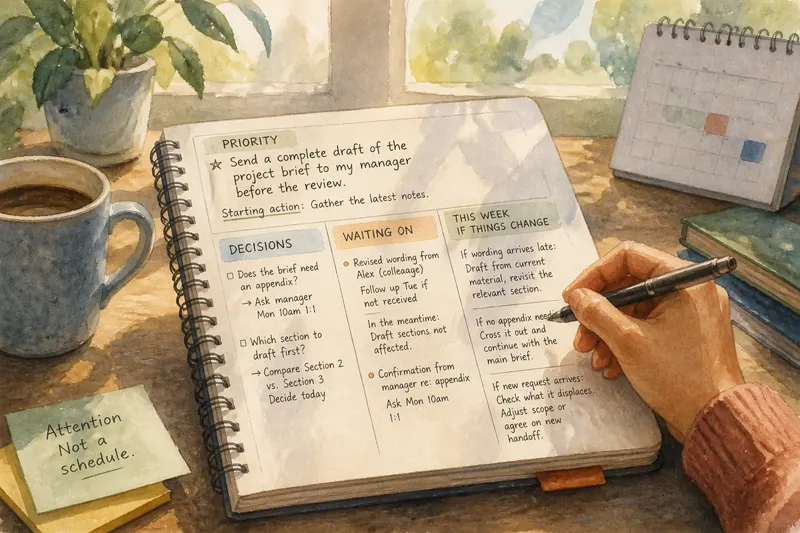
A Sunday reset on one page should make Monday’s first decision easier, not assign a job to every empty square in the calendar. Imagine Maya, a fictional project coordinator, opening her notebook beside next week’s calendar. She wants to know what needs attention, what she can decide now, and what must wait for someone else’s answer.
She draws three headings: “Priority,” “Decisions,” and “Waiting on.” The page is an attention aid, not a miniature schedule: it keeps the week’s important choices visible without turning every available hour into a claim.
A Sunday reset on one page starts with a result
Maya writes one priority: “Send a complete draft of the project brief to my manager before the review.” The outcome is specific enough to recognize, unlike “make progress,” which can expand indefinitely while producing little evidence of completion.
She chooses this result because the material for a first draft is already available and the work is within her control. A broader project milestone depends on decisions from other people, so she does not use that milestone as her weekly target.
One priority does not cancel routine duties or new requests. It gives Maya a useful point of reference when two substantial tasks compete for her attention.
Under the priority, she adds a starting action: “Gather the latest notes.” That makes the intended result easier to approach without creating a second headline goal.
Decisions belong on the page when they change the work
Maya has not yet decided whether the brief needs an appendix. She also needs to choose which of two existing project sections to draft first. She writes both under “Decisions,” then notes who can resolve the appendix question and when she can ask.
This heading is for choices Maya can make, not every unknown in the project. A decision should lead to an action, such as drafting a section, asking a reviewer, or narrowing the scope. If the answer depends on someone else, Maya records that under “Waiting on” instead.
That distinction prevents a page from disguising uncertainty as completed planning. “Finish brief” hides the unanswered appendix question; “Ask manager whether an appendix is needed” makes the next move visible.
Waiting on separates other people’s responses from personal tasks
Maya lists two dependencies: revised wording from a colleague and confirmation from her manager about the appendix. These are not tasks she can complete by wishing harder. She records the person or source and the next occasion when she can follow up.
She also decides what she can do in the meantime: draft the sections that do not rely on the revised wording, then adapt them if the material arrives. The page therefore holds both the dependency and the action still available to her.
Say the colleague has not sent the wording by Tuesday, and Maya’s draft is due before a later review. She uses the current wording to draft the unaffected sections, asks the manager about the appendix at their scheduled conversation, and marks the wording as still pending. The observable result is a partial draft that can move forward, with the unresolved dependency clearly identified rather than mistaken for a completed handoff.
A brief page review keeps attention on the right work
Before closing her notebook, Maya checks each line against a simple question: does this affect the priority, require a decision, or depend on an answer? If a line does none of those things, it may belong in a task manager or nowhere on this page.
- Priority: If the line names a recognizable result for the week, keep it; if it describes a vague ambition, rewrite it as an observable outcome or remove it.
- Control: If Maya can take the next action herself, place it under “Decisions”; if progress rests with someone else, record the person or source under “Waiting on.”
- Dependency: If an unanswered question could change the work, note who can answer it and when to ask; if it would not change the next action, leave it off this page.
- Duplicate detail: If a calendar or task manager already holds the exact time or full instructions, keep the reference there; if the page needs context to guide a choice, add a short note.
- New request: If it displaces the priority, identify what will be delayed or reduced; if it can wait without changing the week’s intended result, place it in the appropriate task list.
- Unsettled plan: If a line depends on information not yet available, mark it as pending; if the information arrives, update the decision and remove the obsolete question.
She notices that an optional coffee is written as though it were settled. Since no time or firm agreement exists, she removes it from “Waiting on” and makes no claim on her work page. That keeps a possibility from quietly becoming an obligation.
The page should adapt when the week changes
On Monday, Maya learns that the revised wording will arrive later than expected. She keeps the priority but updates the plan: draft from the current material and revisit the relevant section when the colleague responds. When her manager confirms that no appendix is needed, she crosses out that question and continues with the main brief.
Later, an unexpected request competes with the draft. Maya checks whether the request must happen now and what it would displace. If she accepts it, she can reduce the draft’s scope or agree on a different handoff; if it can wait, she can return to the priority without pretending the request never arrived.
A page that changes is doing its job. It records current decisions and dependencies, not a promise that the week will remain obedient.
Which questions make a one-page reset useful?
What should I put under “Decisions”?
Write down choices that affect what you will do next, such as which section to draft first or whether to ask for a narrower scope. If the choice is already settled, record the action it leads to rather than keeping the question open.
How is “Waiting on” different from a task list?
“Waiting on” records something that depends on another person or source, along with a useful follow-up point. A task list records actions you can take yourself, so the two headings do not make other people’s responses look like your unfinished work.
What if I have several important priorities?
Choose the result that most needs attention during the coming week, then keep other responsibilities in their usual task lists. If two results truly compete, write down the choice or trade-off you need to resolve rather than labeling both as the single priority.
Should I put appointments and exact times on the page?
Use the calendar for appointments and time-specific details. Add a brief reference on the page only when it helps explain a decision or dependency, such as asking the manager about the appendix at the scheduled review.
Stop when the page supports the next decision
Maya’s invented week ends with a draft ready for review, but that tidy result is not the measure of a useful reset. The page helps even if the draft changes, a response arrives late, or a new request forces a trade-off.
For a Sunday reset on one page, write one result, the decisions that could change your next action, and the answers you are waiting for. Keep exact appointments and detailed tasks in their usual tools; let the page show what deserves attention and what remains unresolved.
When Monday presents a choice, the page should help you name what changes if you say yes. That small act of making the trade-off explicit is often more useful than adding another line to the plan.